ENT4118.36SL4112.87(-54.9)TP4134.11(+157.5)RR2.87
FX Intelligence Trading Platform
Built for MT5Founding access — for the first 200 tradersFXAthena is one platform for every trading decision: analyse, plan, execute on MT5, manage and review — with a risk coach that flags bad habits before they become costly mistakes.Built for retail and prop traders, because discipline builds the edge.
The workflow
Your entire trading workflow, in one system.
01Analyseof 05
Market intelligence, built by our trading desk.
From proprietary tools like FX Funds Flow Signals and FX Strength to familiar indicators reimagined for better market analysis, every tool is developed in-house — from its underlying logic to how it appears on your chart. Spend less time assembling indicators and more time understanding the market.
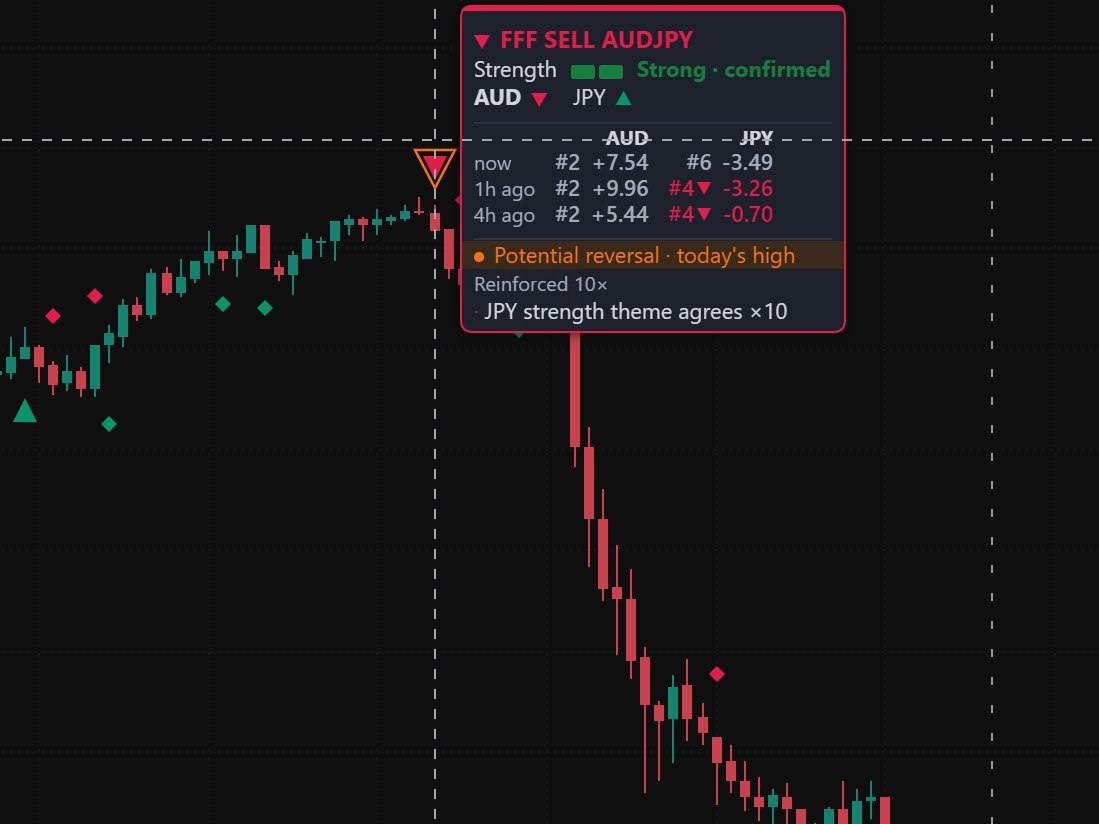
FX Funds Flow — sell signal on the chart
02Planof 05
Define your entries, manage your risk and map your exits
Plan your entries, calculate position sizes with your broker's commission counted in your risk, and structure your exits. Whether it's a single order or a multi-entry strategy, bring every part of your trade together before sending it to MT5.
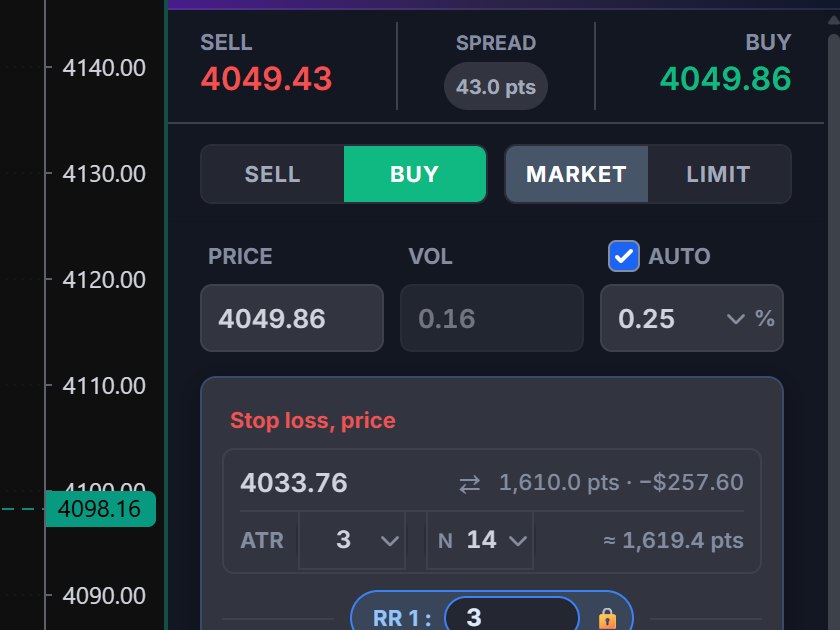
Position sizer — lot size from 0.25% risk
03Executeof 05
Trade from your chart, straight to MT5.
Place orders, position your entry, stop loss and take profit directly on the chart, and send trades to any of your connected MT5 accounts. Connect up to four accounts and trade without switching platforms.
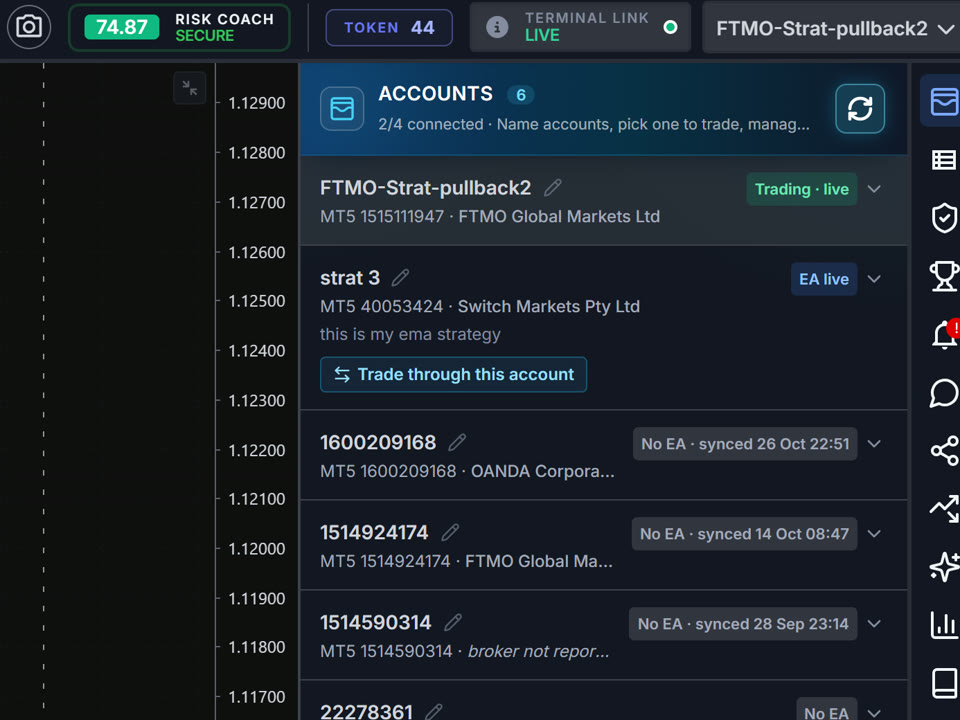
Up to 4 MT5 accounts — named, noted, and one click to trade through any of them
04Manageof 05
Manage trades as the market moves.
Adjust stops and targets on the chart, automate trailing stops and breakeven, monitor high-impact news affecting open positions, and set P&L limits to close all positions automatically at your chosen thresholds.
Drag-to-adjust — drag a live gold sell's stop and target on the chart, money, % and points shown, then update MT5
05Reviewof 05
Review every trade and find what works.
See how you're performing, and replay your past trades or any past day bar by bar across timeframes. Compare your execution against your plan, analyse results across instruments and sessions, and identify recurring patterns in your trading.
Trade & Market Replay — Select any past trade and replay its price action bar by bar, from entry to exit.
Replay · Part of Review
Replay your trades. Revisit any market day.
Replay your MT5 trades bar by bar, including every stop-loss and take-profit change as it happened. Or revisit any past day across your charts and timeframes, and practise trading with simulated funds.
MT5 Trade Replay
Review entries, stop-loss and take-profit changes, and exits as they happened.
Market Replay
Step through any past day with all your charts and timeframes moving together.
Practice
Trade a past day with simulated funds, then see how the session went.
Risk Management · under all five steps
Set your risk limits. Trade within them.
Set your risk per trade, daily loss and overall drawdown limits. FXAthena checks each order against your risk rules and existing exposure, blocking trades that exceed your limits. Risk Coach scores your risk live as you trade, monitoring positions and account exposure while flagging revenge trading, adding to losers, moving stops and overtrading.
Your risk rules, enforced.
Break a risk limit and the order is refused. It never reaches MT5.
- Risk per trade1.00%
A firm ceiling on every trade's risk. To increase your risk after a loss, you have to change your settings first. That extra step creates a pause before an emotional decision can dictate your next position size.
- Daily drawdown3.00%
Tracks today's losses, open-position risk, pending orders and the proposed trade against your daily loss limit. An order that would breach the limit is blocked.
- Maximum drawdown8.00%
Enforces your chosen drawdown model, whether static, intraday trailing or day-end trailing. Orders that could breach your maximum loss limit are blocked.
- Stop loss requiredAlways
Every order must have a stop loss before it can be sent. This ensures every trade has a defined risk from the moment it is placed.
Example · Sell EURUSD · 0.75% riskBlocked
At risk today if this fillsdaily limit 3.00%
- Lost today 1.10%
- Open stops 1.25%
- New order 0.75%
Projected daily loss 3.10% reaches your 3.00% daily limit — cut volume.
More than a set of risk limits.
Pick one to see how it works.Increase pending
Daily loss limit in force1.50%Your total loss for today can't go past 1.50%
Requested limit+1.00%
2.50%Takes effect in1:58:00
How long a change waits
- Raise by up to 1 point 1.5% → 2.5%2 hours
- Raise by more than 1 point 1.5% → 3%4 hours
- Lower your limitImmediate
Prop Firm ModeOn
Firm daily loss limit5.00%
Highest personal limit allowed5.00%
Your personal daily loss limit can't go above the firm's while Prop Firm Mode is on.Works with MT5 broker or prop firm
Straight into MetaTrader 5 — in under a millisecond.
FXAthena links to your terminal through a lightweight MetaTrader 5 Expert Advisor. Orders land in under 1 ms — varying with your internet connection — and your capital stays in your own broker account.
Cross-brokerTraders on different MT5 brokers can copy each other's trades — all in one platform.
No passwordsFXAthena never asks for your MT5 login — the Expert Advisor runs inside your own terminal.
<1ms
One trading platform to rule them all.
15 years isn't a number. It's every regime since the GFC.
FXAthena is built by traders who've worked FX through every major regime since 2008 — not a backtest, but real exposure to how markets actually break, panic, and recover. The tools here encode what survived each one.
- 2008Global Financial CrisisSubprime cracked the system. Volatility went vertical and, for a stretch, the sky really was falling.
- 2009QE & Zero RatesCentral banks flooded the system with liquidity — and currencies printed generational highs against the dollar.
- 2012European Debt CrisisSovereign spreads exploded and the euro's survival was in doubt — until Draghi's “whatever it takes” drew the line. Super Mario, doing what the politicians couldn't.
- 2015SNB Franc ShockThe SNB yanked the EURCHF floor — 30% in minutes. Stops didn't fill and brokers went bust. We were trading through it.
- 2016BrexitCable gapped a thousand pips overnight — a live lesson in tail risk and stops that don't fill.
- 2018US–China Trade WarTariffs and risk-off by tweet — the yuan crept toward 7.00 and every risk currency moved with it.
- 2020The Covid CrashThe fastest crash and recovery on record, then the biggest liquidity flood yet.
- 2022Inflation Shock & TighteningThe end of free money — aggressive hikes and a dollar that ran over everything.
Different decade, same discipline.
Pricing
One plan, the entire Intelligence platform.
Built for MT5. Start with a free trial — no credit card required.
Founding access — limited to 200 traders
Free trial
TelegramFree
- No credit card required
- Activate instantly by sending Start to our Telegram bot and registering via the secure link.
- Try the platform using a demo account with a recommended broker (Switch Markets or Eightcap) or our preferred prop firm, FTMO.
- 1 MT5 account with 20 trade executions included
- Access to our custom indicators & trading signals
- 7 credits for the AI Strategy Hub
- One Trade Planner plan
- Social board, chatroom & Trading Journal unlock when you upgrade
Monthly
49.99/month
- Unlimited trade executions to up to 4 MT5 accounts
- Full access to our custom indicators & trading signals
- Risk Coach — live risk scoring, drawdown limits & Prop Challenge tracking
- Trade Planner — unlimited multi-entry plans & custom strategy templates
- Advanced entries & exits — OCO, trailing stop, breakeven & timed closes
- Trading Journal with trade review, replay & insights
- Social trading — Social trade board, Shared Trade Planner & chatroom
- 50 AI Strategy Hub credits a month
- Billed monthly — cancel anytime
Most popular
Quarterly
119.99/quarter
- 39.99 a month — save 20% vs monthly billing
- Everything in Monthly
- Priority support — fast-tracked responses from our team
- Early access — be first to use new features, engines & tools before public release
- Exclusive invitation to webinars with seasoned traders & industry guest speakers
Free trial valid for new users only. Terms apply.
FAQ
Questions, answered.
The free trial is activated through our Telegram bot — no card required. Open @TradeawaayVerifyBot, send the message start, and the bot replies with your personal sign-up link. Click it to create your account and take FXAthena for a test drive.
Yes. You can cancel anytime directly from your account settings. Once you cancel, you won't be charged again after your current billing period.
Yes. We never store your financial details. All payments are processed securely by our trusted partner, Stripe.
Not yet — we currently support MetaTrader 5 only. As MetaQuotes winds down MT4, we're focused on MT5 and plan to expand to platforms like cTrader and DXtrade.
No, we never store your MetaTrader 5 login details. FXAthena connects through an Expert Advisor that only runs after you've logged into your own terminal.
Up to four on a paid plan, and one during the free trial. Each account runs the Expert Advisor in its own MetaTrader 5 terminal, and you choose which account receives each order.
FXAthena works like a trade manager. Every order is placed by the Expert Advisor inside your own MetaTrader 5 terminal, so it reaches your broker from your terminal's IP address, the same as a trade you place in your terminal.
Most prop firms allow trade managers, but rules differ, so check your firm's terms on Expert Advisors before you start. If you copy trades from the Social board or the chatroom, don't copy them exactly. Many firms flag identical trades across different traders' accounts as copy trading. Adjust the entry, size or timing to suit your own plan. You remain responsible for following your firm's rules.They block them. FXAthena checks every order before it reaches MT5. If an order breaches a risk limit or is missing a stop loss, it is rejected. Increases to your daily loss limit take 2 to 4 hours to apply, preventing you from immediately increasing your limit after a loss. Risk Coach only provides warnings.
Follow the step-by-step video tutorial in the setup section to install the Expert Advisor. Watch the video
We recommend the latest version of Google Chrome for the best experience.
Yes. Split your chart area into a layout of up to eight charts, each with its own symbol and timeframe, for example H1 or M15 for structure and M1 for entries. The crosshair lines up by time across every chart, and your orders' entry, stop and target stay in sync across every timeframe of that pair. Multi-Timeframe Bias also shows the higher-timeframe direction as zones on a single chart.
Yes. Replay any of your MT5 trades bar by bar and watch every stop-loss and take-profit change appear when you made it. You can also pick any past day and step through it across your charts and timeframes, with economic results shown only after their release time, and place practice trades with simulated funds. Practice is manual, on historical prices, and nothing is sent to MT5.
No — FXAthena is built for desktop and laptop only. The charting, multi-leg planning, and execution tools need the screen space and pointer precision of a real computer, so you'll need a Mac or PC to sign in and trade.
Forex, gold and silver work on every supported broker. Indices, oil and crypto are available on selected brokers, including FTMO.
We support FTMO, Eightcap, ThinkMarkets, Purple Trading, Blueberry Markets, The5%ers, Fintokei, Vantage, Fusion Markets, Forex.com, IC Markets, FXPRO, XM Global, BlackBull Markets, FP Markets, PU Prime, OANDA, Trading.com, Switch Markets, and FundedNext. If your broker isn't on the list, the Expert Advisor won't run — message us the details and we'll work on onboarding it.
In our testing, MetaTrader 5 execution is typically around 1 millisecond (ms), though this varies with your internet connection.
No — if you trade at your computer, MT5 on your own Mac or PC is enough. Some features need the Expert Advisor connected, though, so if you want them working while you're away, use a VPS (from about $10/month) to keep MT5 running.
Yes. FXAthena includes its own custom indicators, such as FX Strength, FX Funds Flow signals, Trend Signals, Multi-Timeframe Bias, Wave structure and support and resistance zones, alongside the classics: moving averages, RSI, MACD, Bollinger Bands, Stochastic, Ichimoku, ADX, Supertrend, pivot points, ATR, volume profile and more.
Contact
Need help, or just want to ask?
Real traders on the other end — not a support queue. Ask us anything about the platform, your broker, or getting set up.
— FXAthena by Tradeawaay
Reach the team directly.
Message us on Telegram